 A press release should never be a one-and-done asset.
You took the time to shape a real announcement. You gathered the facts, found the quote, clarified the angle, and sent it into the world. That work has more value than a single distribution date.
The best press releases are raw material. One good release can feed your blog, email list, social channels, sales team, media outreach, and website. Do not copy and paste the same announcement everywhere. Reshape the story for each audience.
A journalist needs the facts quickly. A customer needs context. A social follower may only need one useful idea. A sales prospect may need proof that your company is active, credible, and moving forward.
Same news. Different uses.
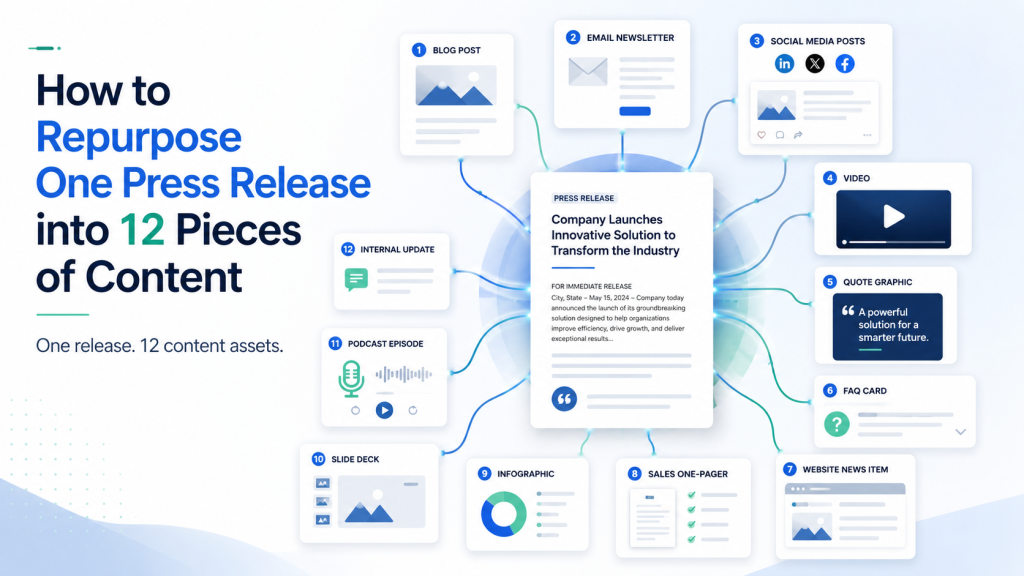
Here is how to turn one press release into 12 practical pieces of content.
Start with the core story
Before you repurpose anything, identify the center of the announcement.
Ask three questions:
- What actually happened?
- Why does it matter?
- Who should care?
That keeps repurposing from becoming busywork.
Let’s say your company launched a new service that helps dental practices reduce missed appointments. The release may contain several angles: the product news, the customer problem, the founder’s point of view, the industry context, and a local angle.
Each of those can become content.
Think of the press release as the trunk of the tree. The repurposed pieces are the branches. They should connect to the same story, but each one should have its own job.
1. Turn it into a blog post
The press release gives the facts. The blog post gives the explanation.
A release is written for journalists and news distribution. A blog post is written for your audience. That means it can slow down and answer the questions a customer might have:
- What problem does this solve?
- Why did you create it?
- What makes this different?
- Who is it best for?
- What should someone do next?
If the release says, “ABC Software today announced the launch of its new appointment recovery platform,” the blog post can begin with the customer problem:
“Every missed appointment costs a dental practice time, revenue, and momentum. We built our new platform to help practices reduce no-shows without adding more work for the front desk.”
For a deeper look at this specific approach, eReleases has a practical guide on turning a company press release into a blog article
That shift matters. The release announces. The blog post explains.
2. Create a short website news item
Not every announcement needs a long article. Sometimes you need a simple news item.
This could live in a “News,” “Company Updates,” or “Press Room” section. Keep it short: 200 to 400 words is often enough.
Use the basic facts from the release, add a link to the full announcement, and include a clear next step.
This gives your website a record of momentum. It also helps visitors see that your company is active.
3. Write an email to customers or subscribers
Your email audience does not need the press release version. They need the “why this matters to you” version.
That means your subject line should focus on benefit, not ceremony.
Instead of:
“ABC Software Announces New Appointment Recovery Platform”
Try:
“A simpler way to reduce missed appointments”
The email can be brief. Explain what changed, who it helps, and what action the reader can take.
A good structure:
- Open with the problem or opportunity.
- Explain the announcement in plain language.
- Add one proof point or quote.
- Invite them to read more, book a demo, register, download, or reply.
The press release may be about your company. The email should be about the reader.
4. Create a LinkedIn post from the founder or CEO
A company page post is fine. A founder post is better, because people respond to people.
Turn the announcement into a short reflection from the leader behind it. This should not be a victory lap. It should explain the thinking behind the move.
For example:
“We kept hearing the same thing from dental office managers: they did not need more software to manage. They needed fewer missed appointments and less manual follow-up. That is what led us to build this.”
That kind of post gives the news some human weight. It shows there was listening behind the launch.
Keep it specific. Specific beats polished almost every time.
5. Break out three short social posts
One press release can usually produce several short social posts.
Do not post the same thing three times. Pull three different angles.
Using our dental software example, you could create:
- A problem-focused post: “Missed appointments are not just calendar gaps. They are lost revenue, staff frustration, and delayed care.”
- A launch-focused post: “We just launched a new appointment recovery platform built for dental practices.”
- A quote-focused post: “Our founder said it best: ‘The front desk does not need more tasks. It needs better tools.’”
Each post has a different role. One educates. One announces. One humanizes.
Your audience rarely sees every post. Repetition is not the problem. Lazy repetition is.
6. Turn the announcement into a customer FAQ
A press release often raises practical questions.
Use those questions to create a short FAQ for your website, sales team, support team, or onboarding process.
For a product launch, the FAQ might include:
- Who is this for?
- How does it work?
- Is it available now?
- What does it cost?
- Can current customers use it?
- How do I get started?
For a partnership, the questions may be about what changes for customers. For an event, they may be about registration, schedule, or location.
An FAQ is not glamorous. That is exactly why it works.
People do not always want the full story. Sometimes they want the one answer that helps them move forward.
7. Create a sales enablement one-pager
Your sales team should not have to translate company news on the fly.
Turn the press release into a one-page internal or external sales aid. Include:
- The announcement in one sentence
- Who it matters to
- The main customer benefit
- Three talking points
- One proof point
- A short response to “Why now?”
- A link to the release or blog post
This is especially useful for announcements that affect prospects: new features, new locations, partnerships, awards, funding, certifications, or major customer wins.
A press release can create credibility. A sales one-pager helps your team use that credibility in real conversations.
8. Pitch a follow-up story to targeted journalists
The press release is not always the end of media outreach. Often, it is the beginning.
After distribution, look for narrower story angles that might interest specific journalists.
For example:
- A local business reporter may care that a company in their city is growing.
- A trade reporter may care about the industry problem the product solves.
- A podcast host may care about the founder’s backstory.
- A columnist may care about a trend reflected in the announcement.
You are not blasting the same release again. You are using the release as a source document and shaping a more relevant pitch.
A short pitch might say:
“We recently announced a new platform for dental practices, but the larger story is how small healthcare offices are using automation to reduce administrative strain.”
That is more interesting than “Please cover our launch.”
Journalists do not need more announcements. They need good story angles.
9. Pull out a quote graphic
Most press releases include at least one executive quote. Some include customer or partner quotes.
Turn the strongest sentence into a simple quote graphic for LinkedIn, your website, or an email newsletter.
The key word is “strongest.” Not every press release quote deserves a graphic.
Avoid the kind of quote that says, “We are thrilled to announce…” That phrase has been used so often it has lost its pulse.
Look for a quote that says something real: a belief, a lesson, a customer insight, a clear point of view, or a useful prediction.
A quote graphic gives the announcement a longer shelf life and makes the story easier to share.
10. Create a short video script
You do not need a full production crew. A simple 45- to 90-second video can work well.
Use the press release as the backbone, but make the video conversational.
A basic script structure:
- “Here is what we announced.”
- “Here is why we built it.”
- “Here is who it helps.”
- “Here is what you can do next.”
The speaker could be the founder, product lead, nonprofit director, event organizer, or customer success manager.
Video works because it adds tone. A quote in a release can feel formal. A person explaining the same idea on camera can feel direct and trustworthy.
11. Build a newsletter section
Your announcement may not need its own dedicated email, especially if your audience receives a regular newsletter.
In that case, turn the release into a newsletter section.
Give it a short headline, a few sentences of context, and one link.
For example:
“New resource for dental practices: We recently launched our appointment recovery platform to help practices reduce no-shows and ease front desk follow-up. Read the full announcement.”
This keeps customers, partners, and prospects informed without making every update feel like a major campaign.
It also trains your audience to expect steady, useful updates from you.
12. Create an evergreen resource
The best repurposed content often comes from the larger issue behind the announcement.
Ask: What topic does this release point to that people will still care about six months from now?
A product launch can become a guide. A survey release can become a benchmark report. A new hire announcement can become an article on leadership priorities. A nonprofit campaign can become a resource page about the cause.
For our dental software example, the evergreen resource might be:
“How Dental Practices Can Reduce No-Shows Without Overloading the Front Desk”
That piece can mention the new platform, but it should not read like an ad. It should teach.
Evergreen content gives your press release a second life in search, sales, and customer education.
That is the quiet value of repurposing. You stop treating the release as a single event and start treating it as an asset.
A simple workflow for repurposing
You do not need to create all 12 pieces in one afternoon.
Start with this practical workflow:
- Publish or distribute the press release.
- Turn it into a blog post or website news item.
- Send the customer-facing version by email.
- Create three social posts from three different angles.
- Build one sales or FAQ asset.
- Pitch two or three targeted journalists with tailored follow-up angles.
- Save the evergreen idea for a deeper resource.
This gives you momentum without overwhelming your team.
The real work is not volume. It is translation. That same idea is at the heart of content repurposing: adapting existing content into new formats for new audiences, rather than simply reposting the same thing everywhere.
You are translating the same news for different audiences and different moments.
What not to do
Repurposing does not mean spraying the same paragraph across every channel.
Avoid these common mistakes:
- Posting the press release headline everywhere without context
- Using formal release language in customer emails
- Treating every social post like an announcement
- Creating content that does not add anything new
- Forgetting to link back to the full release or related page
- Making the story all about the company instead of the audience
The simplest test is this: does this version give the reader a reason to care?
If not, rewrite it.
One release, more mileage
A good press release contains more than news. It contains positioning, proof, quotes, customer insight, and timing.
When you repurpose it well, you do not just get more content. You get more chances for the right person to understand why the announcement matters.
A journalist may see the industry angle. A customer may see the practical benefit. A prospect may see credibility. A partner may see momentum.
That is how content starts working harder.
Not by shouting louder. Not by posting everywhere for the sake of posting.
By taking one true story and shaping it carefully for the people who need to hear it.

Mickie Kennedy founded eReleases.com in 1998 after watching PR firms charge small businesses a $20,000 minimum for a single press release. For 27 years, he’s been closing that gap — distributing 150,000+ releases via Cision PR Newswire, serving 30,000+ clients including Manscaped, Squatty Potty, and 40+ Shark Tank brands, and generating $132M+ in earned media. A sought-after podcast guest and two-time Amazon bestselling author of Beginner’s Guide to Writing Powerful Press Releases and The PR Strategy Manifesto. Mickie holds an MFA in Creative Writing from George Mason University. Based in Baltimore, MD. LinkedIn